Web design is one of the most valuable skills in today’s digital world. Whether you want to start a personal blog, build a business website, create an online portfolio, or develop a career in the digital industry, understanding web design can help you turn your ideas into reality. The good news is that you do not need advanced technical knowledge or years of experience to get started. With the right tools, resources, and learning approach, anyone can begin creating attractive and functional websites. This guide to web design for beginners explains everything you need to know, from understanding basic design principles and learning HTML and CSS to choosing the right tools and creating responsive websites. You will also discover practical techniques for improving website usability, organizing content, and creating a positive experience for visitors.
Web Design Basics for Beginners
Before creating your first website, it is important to understand what web design actually means. Web design is the process of planning, creating, and organizing the visual appearance and functionality of a website. It includes everything visitors see and interact with, such as colors, typography, images, navigation menus, buttons, layouts, and content sections.
A well-designed website should look attractive while making it easy for visitors to find the information they need. Good design is not simply about choosing beautiful colors or adding impressive images. It is about creating a balance between appearance, usability, accessibility, and performance.
When learning web design for beginners, start by understanding the difference between web design and web development. Web design focuses mainly on the visual structure and user experience, while web development involves writing code to make website features and functions work.
You should also become familiar with essential design elements such as spacing, alignment, contrast, hierarchy, and consistency. These elements help organize information and guide visitors through a website naturally.
For example, a business website may use a clear headline, a short introduction, service descriptions, customer testimonials, and a contact button. When these elements are arranged properly, visitors can understand the business and take action without confusion.
It is also worth understanding how website design supports digital marketing. A properly developed website can strengthen SEO, improve advertising performance, and support email marketing campaigns. You can explore how these areas work together in this guide to web development, SEO, PPC, and email marketing.
How to Learn Web Design from Scratch
Learning web design from scratch may seem difficult at first, especially if you have never worked with technology or coding. However, you can make the process easier by learning one concept at a time and practicing regularly.
Start by understanding how websites are structured and how different elements work together. Visit websites you enjoy and pay attention to their navigation, color combinations, layouts, images, and content placement. Notice how professional websites guide visitors from one section to another.
After understanding the basics, explore beginner-friendly design platforms and website builders. These tools allow you to experiment with website layouts without writing complicated code. Once you become comfortable with basic design, you can gradually move toward HTML, CSS, and other development technologies.
Online tutorials, video lessons, blogs, and free courses can also help you develop your skills. Instead of watching tutorials without practicing, try recreating the layouts you see. This approach helps you understand how different design elements work in real situations.
Another useful learning method is to create small projects. For example, you can design a personal portfolio, a simple business homepage, or a landing page for a fictional product. These projects allow you to apply your knowledge and identify areas where you need improvement.
The most important part of web design for beginners is consistency. You do not need to master every design tool or programming language immediately. Focus on understanding the fundamentals, practicing regularly, and gradually building more complex websites.
Beginner-Friendly Web Design Tips
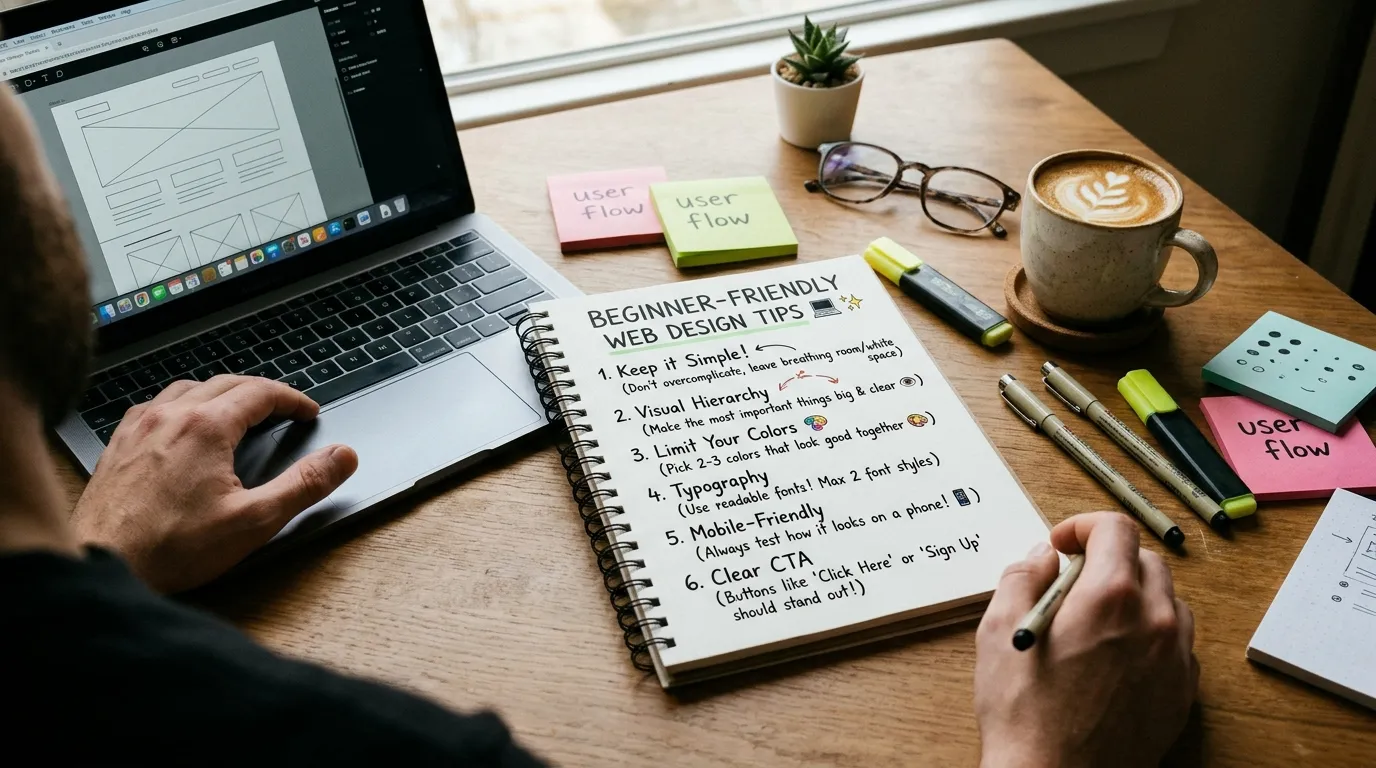 Creating an attractive website does not require complicated design techniques. A few practical decisions can make a significant difference in how your website looks and performs. One of the most important tips is to keep your design simple. Avoid adding too many colors, fonts, animations, or unnecessary elements. A clean layout makes your website easier to understand and helps visitors focus on important information.
Choose a consistent color palette that matches your website’s purpose. For example, a professional business website may use neutral colors with one or two accent colors, while a creative portfolio may use more expressive combinations. Typography is equally important. Choose readable fonts and maintain a clear difference between headings, subheadings, and paragraph text. Make sure the font size is comfortable on both desktop and mobile devices.
You should also pay attention to white space. White space refers to the empty areas between text, images, buttons, and other website elements. Proper spacing prevents pages from looking crowded and makes content easier to read. Another useful technique is to make important information easy to find. Your logo, navigation menu, main headline, and primary call-to-action should be placed where visitors can locate them naturally. When following web design for beginners, remember that visitors should never have to work hard to understand your website. Every design decision should make browsing easier and create a smooth experience.
Introduction to Website Design
Website design involves combining different visual and functional elements to create a complete online experience. A website usually contains several important sections, including a homepage, about page, services or product pages, blog, and contact page. The homepage is often the first page visitors see, so it should communicate the website’s purpose clearly. A strong headline, supporting description, relevant images, and clear navigation can help visitors understand what the website offers.
The about page provides information about a business, individual, or organization. It helps establish credibility by explaining the background, experience, values, and purpose behind the website. Service and product pages should explain what you offer and why visitors should consider it. Use descriptive headings, helpful information, relevant images, and clear calls to action.
A blog can provide additional value by answering questions, sharing industry knowledge, and attracting visitors through search engines. Publishing useful content consistently can also help establish your website as a trusted information source. Brand consistency is another important part of website design. Your logo, colors, typography, messaging, and visual style should create a recognizable identity across different pages. Strong brand experiences can encourage visitors to develop trust and long-term connections with a business. For additional insights, read about brand loyalty and building lasting customer relationships. Understanding these different website sections will make web design for beginners easier because you will have a clear idea of what each page needs to accomplish.
HTML and CSS for Beginners
HTML and CSS are two essential technologies used to create and style websites. If you want more control over your website’s appearance and structure, learning these languages is a valuable step. HTML stands for HyperText Markup Language. It provides the basic structure of a webpage by defining elements such as headings, paragraphs, images, links, lists, and forms. For example, when you write a heading in HTML, you use a heading element. When you want to display a paragraph, you use a paragraph element. These elements help browsers understand how website content should be organized.
CSS stands for Cascading Style Sheets. It controls the visual appearance of HTML elements, including their colors, sizes, spacing, backgrounds, borders, and positioning. Imagine that HTML creates the structure of a house, while CSS determines its paint, decoration, and overall appearance. Both technologies work together to create a complete webpage. You can start learning HTML by creating a simple page containing a heading, a few paragraphs, and an image. After that, use CSS to change the background color, adjust font sizes, add spacing, and organize the content.
As you become more comfortable, explore CSS Flexbox and Grid. These layout systems make it easier to arrange website elements and create professional designs. Learning HTML and CSS does not mean you must become an expert programmer immediately. For web design for beginners, understanding the basic structure and styling concepts is enough to begin creating simple websites and gradually improving your skills.
Responsive Web Design Basics
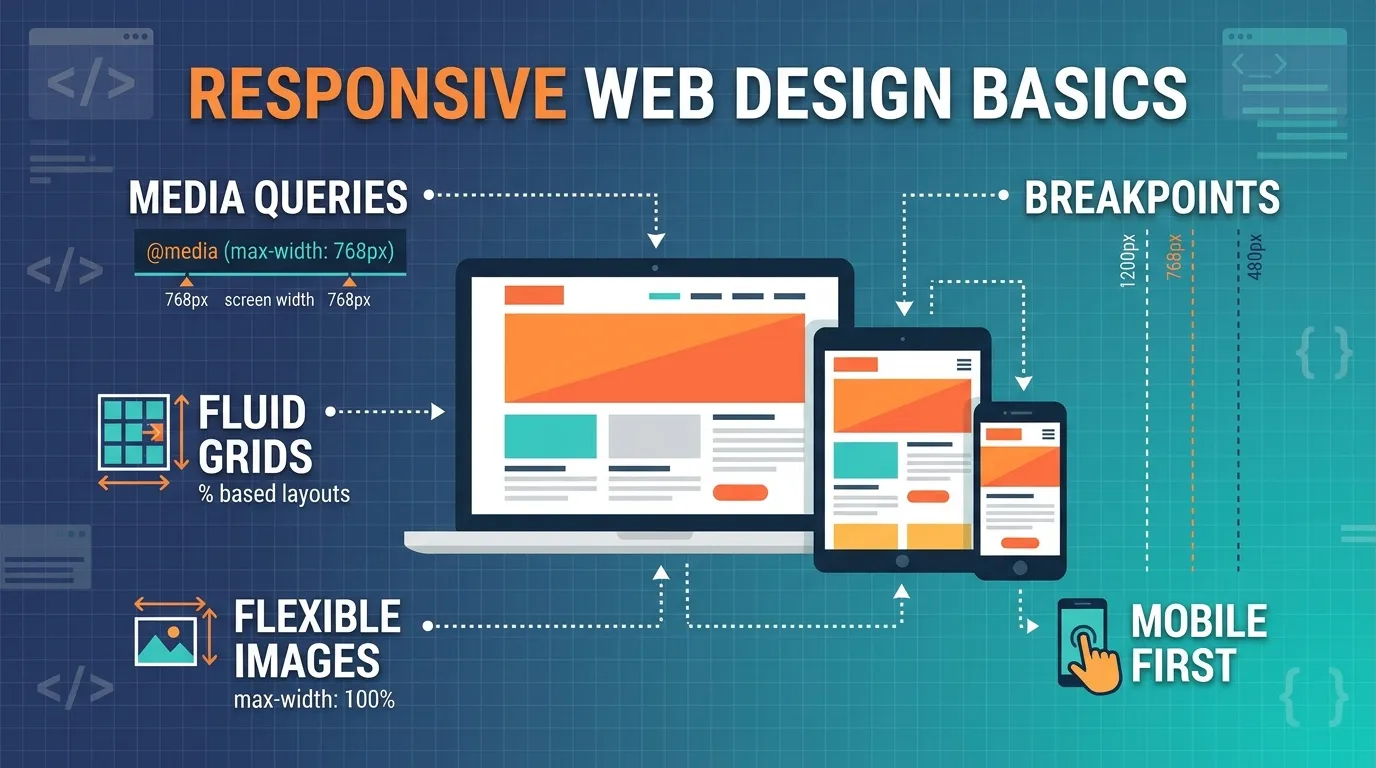 People access websites through different devices, including desktop computers, laptops, tablets, and smartphones. Therefore, your website should look and function properly across different screen sizes. This approach is called responsive web design. A responsive website automatically adjusts its layout, images, text, and other elements according to the visitor’s screen size. For example, a desktop website may display three service sections side by side, while the same sections appear vertically on a smartphone.
One of the main techniques used in responsive design is flexible layouts. Instead of giving every element a fixed width, designers use relative measurements and flexible containers that can adjust to available screen space. CSS media queries are another important feature. They allow designers to apply different styling rules depending on the device or screen dimensions.
Images should also be optimized for different devices. Large images can slow down websites, particularly on mobile connections. Compressing images and using suitable image sizes can improve loading performance. Mobile navigation is another area that deserves attention. Menus should be easy to open, buttons should be comfortable to tap, and text should remain readable without requiring visitors to zoom in.
Testing is essential when creating responsive websites. Check your pages on different screen sizes and use browser developer tools to identify layout problems. Responsive design is a fundamental part of web design for beginners because a website that works well on mobile devices can provide a better user experience and help businesses reach more visitors.
Website Layout and Design Principles
A website layout determines how information is arranged on a webpage. A well-organized layout helps visitors understand your content, navigate between sections, and complete important actions. One of the most important principles is visual hierarchy. It means arranging website elements according to their importance. Main headings should attract attention, supporting headings should organize information, and paragraph text should provide additional details.
Alignment is another essential principle. Website elements should follow a consistent structure instead of appearing randomly across the page. Proper alignment creates a professional appearance and makes information easier to follow. Contrast helps important elements stand out. You can use contrasting colors for buttons, headings, and highlighted sections to guide visitors toward important actions. However, make sure the text remains readable and accessible.
Consistency is equally important. Use similar colors, typography, button styles, and spacing throughout your website. When every page follows the same visual language, visitors can navigate the website more comfortably. You should also consider the purpose of each section before deciding where to place it. For example, a contact button should appear in a location where visitors can easily find it, while supporting information can be placed further down the page. When applying web design for beginners, remember that an effective layout should prioritize visitors’ needs rather than simply filling every available space with decorative elements.
Best Web Design Tools for Beginners
Choosing the right tools can make website creation easier and more enjoyable. Fortunately, many beginner-friendly platforms allow you to design websites without extensive coding knowledge. One popular option is WordPress. It is a content management system that allows users to create blogs, business websites, portfolios, and online stores. Its themes and plugins provide different customization options, making it suitable for people with different experience levels.
Wix is another beginner-friendly platform. Its visual editor allows users to arrange website elements and customize page layouts. It can be useful for people who want to create a website without writing code. Webflow provides more advanced design flexibility. It combines visual website building with features that offer greater control over layouts, responsive behavior, and styling. Beginners may need some time to understand its interface, but it can be valuable as their skills improve.
For interface and layout design, Figma is also worth exploring. It allows designers to create website mockups, prototypes, and interface layouts before building the actual website. You can also use code editors such as Visual Studio Code when learning HTML and CSS. A code editor helps you write, organize, and manage website code more efficiently. The best tool depends on your goals, budget, and technical experience. If you are just starting with web design for beginners, choose a simple platform first and gradually explore more advanced tools as your confidence grows.
User-Friendly Website Design Techniques
A user-friendly website makes it easy for visitors to understand information, find what they need, and interact with different features. User experience, commonly known as UX, plays an important role in successful website design. Start by creating straightforward navigation. Your main menu should contain clear labels that describe the pages visitors can access. Avoid confusing menu structures or unnecessary navigation options.
Next, focus on website speed. Visitors may leave a website if pages take too long to load. Compress images, reduce unnecessary scripts, use reliable hosting, and optimize your website’s resources to improve performance. Accessibility should also be a priority. Use readable font sizes, sufficient color contrast, descriptive image alternative text, and properly labeled forms. These practices help people with different abilities access your content more easily.
Calls to action are another important feature. Buttons such as Contact Us, Get Started, Learn More, and Request a Quote should clearly communicate what happens when visitors click them. Their placement should feel natural rather than interrupting the browsing experience. You should also understand your visitors’ expectations. Customer feedback, website analytics, and social media conversations can reveal what people find useful or frustrating about your online presence. Following relevant social media listening best practices can help businesses understand audience preferences and identify opportunities to improve their digital experiences. For web design for beginners, the main objective should always be to create a website that visitors can use comfortably without needing instructions.
How to Create a Website for Beginners
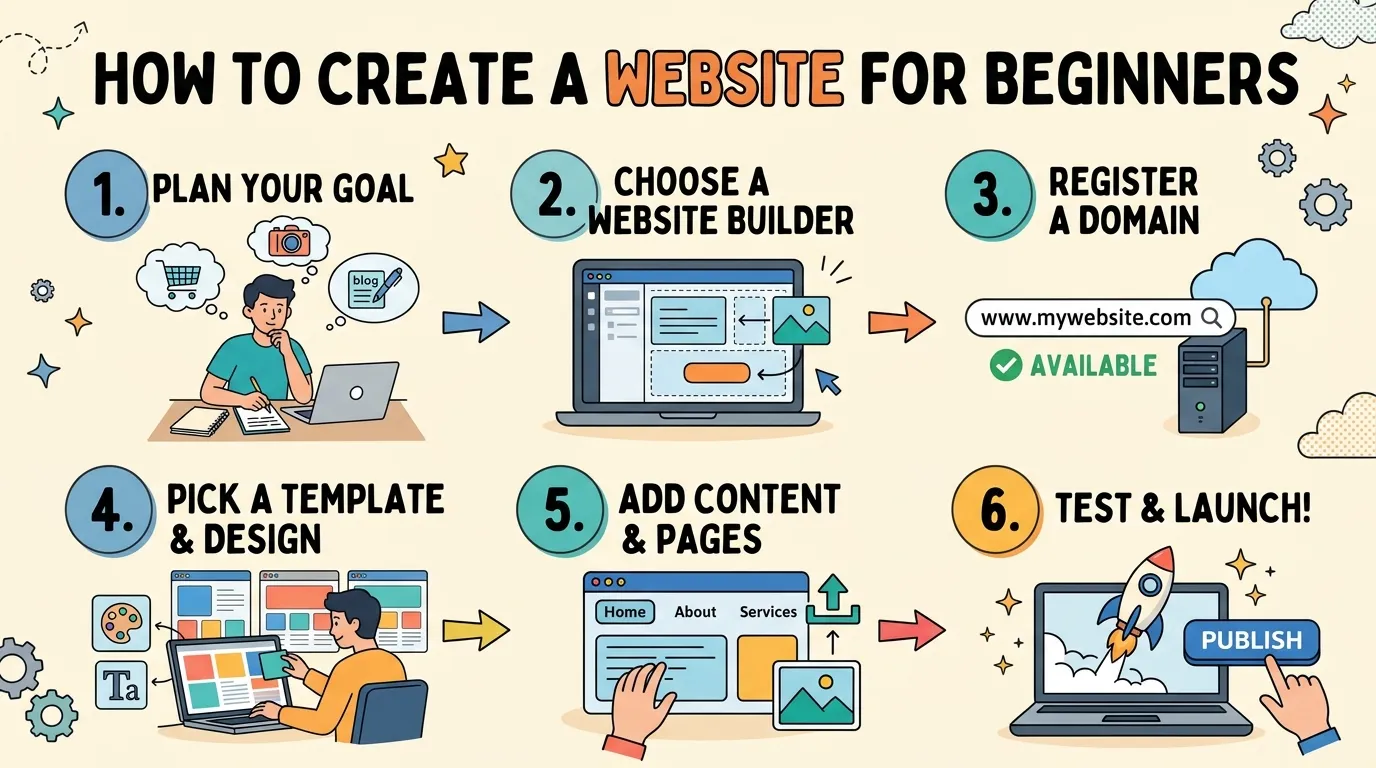 Creating your first website becomes much easier when you follow a clear process. Start by deciding what type of website you want to build. It could be a personal portfolio, business website, blog, educational platform, or online store. Once you have selected your website’s purpose, choose a suitable domain name. Your domain name is the web address people use to visit your website. Try to select something short, memorable, and relevant to your brand or project.
Next, purchase a hosting plan if you are using a self-hosted platform such as WordPress. Hosting stores your website’s files and makes them accessible online. Some website builders also provide hosting as part of their service. After setting up your platform, select a suitable theme or create your initial layout. Choose a design that matches your website’s purpose and provides a good experience across different devices.
Now start adding important pages. Most basic websites need a homepage, about page, services or products page, and contact page. If you plan to publish educational content, you can also include a blog section. Pay attention to your website’s content. Write clear headings, informative descriptions, and useful page titles. Add relevant images and make sure every page has a clear purpose.
Once your pages are ready, test the website before publishing it. Check navigation links, buttons, contact forms, image loading, page speed, and mobile responsiveness. Fix any problems that could affect the visitor experience. After launching, continue improving your website by updating content, monitoring performance, and collecting feedback. You can also use video content to explain products, demonstrate services, or introduce your business. Understanding video marketing analytics tools and data can help you evaluate how visitors engage with video content and whether it supports your marketing goals.
Businesses that use their websites to educate potential customers can also create dedicated landing pages for online events. A well-designed registration page, for example, can support a successful webinar marketing strategy by making event information and registration easy to access. With regular practice and improvement, web design for beginners can become a practical skill that helps you build professional websites and explore new career opportunities.
Conclusion
Learning web design does not have to be difficult, even if you are starting with no previous experience. By understanding basic design principles, learning HTML and CSS, exploring beginner-friendly tools, and practicing responsive website layouts, you can gradually develop the skills needed to create professional and user-friendly websites. The key to success is consistency and practical experience. Start with simple projects, experiment with different layouts, and focus on creating websites that are visually appealing, easy to navigate, and accessible across different devices. As your knowledge grows, you can explore more advanced design techniques and improve your creativity.
FAQ
1. What is web design for beginners?
Web design for beginners refers to learning the basic skills and techniques required to create websites. It includes understanding website layouts, colors, typography, navigation, HTML, CSS, and responsive design. Beginners can start with simple website builders and gradually learn more advanced design and development techniques.
2. Can I learn web design without coding?
Yes, you can learn web design without coding. Platforms such as WordPress, Wix, and Webflow offer visual tools that allow you to create websites without writing code. However, learning basic HTML and CSS can give you greater control over your website’s appearance and functionality.
3. How long does it take to learn web design?
The learning time depends on your goals, practice schedule, and learning resources. You may understand basic design concepts within a few weeks, while developing the confidence to create more professional websites can take several months of consistent practice.
4. Is HTML necessary for web design?
HTML is not essential if you use a website builder that handles the coding automatically. However, HTML is useful because it helps you understand webpage structure and gives you more control when customizing website content.
5. What is the difference between HTML and CSS?
HTML creates the structure of a webpage by defining headings, paragraphs, images, and other elements. CSS controls how those elements look by managing colors, fonts, spacing, backgrounds, and layouts. Both technologies work together to create webpages.
6. Which web design tool is best for beginners?
WordPress, Wix, Webflow, and Figma are popular options for different website design tasks. WordPress is useful for building content-based websites, Wix offers a beginner-friendly visual editor, Webflow provides advanced visual design control, and Figma helps create website layouts and prototypes.
7. Do I need to learn responsive web design?
Yes. Responsive web design helps your website adjust to different screen sizes, including smartphones, tablets, and desktop computers. It improves usability and makes your content accessible to visitors using different devices.
8. Can I make money with web design?
Yes. You can earn money by designing websites for businesses, creating personal portfolios, working as a freelancer, joining a web design agency, or building websites for your own projects. Developing a strong portfolio and practical experience can help you find opportunities.
9. What makes a website design user-friendly?
A user-friendly website has simple navigation, readable text, fast-loading pages, accessible content, responsive layouts, and clearly visible buttons. It should help visitors find information and complete tasks without unnecessary confusion.
10. What should I learn first to become a web designer?
Start by learning basic design principles, including color theory, typography, spacing, alignment, and visual hierarchy. Then explore website layout tools and learn HTML and CSS. Practice by creating simple projects and gradually develop your responsive design and user experience skills.