

To improve Core Web Vitals, focus on three metrics: Largest Contentful Paint (LCP) under 2.5 seconds, Interaction to Next Paint (INP) under 200 milliseconds, and Cumulative Layout Shift (CLS) below 0.1. Optimize images, reduce JavaScript, set size attributes on media, and prioritize mobile performance to pass Google’s thresholds.
Slow websites lose visitors. Google knows this, which is why Core Web Vitals became a ranking factor through the Page Experience update. These metrics measure how real users experience your site—how fast it loads, how quickly it responds, and how stable it feels while it loads.
If your pages fail Core Web Vitals, you’re likely missing out on both search rankings and conversions. The good news? Most issues have clear, fixable causes. You don’t need to be a senior developer to make meaningful improvements.
This guide breaks down each Core Web Vital, explains how to diagnose problems, and walks through practical optimization techniques. By the end, you’ll have a clear action plan to fix Core Web Vitals issues and improve your website performance—on both desktop and mobile.
What are Core Web Vitals and why do they matter?
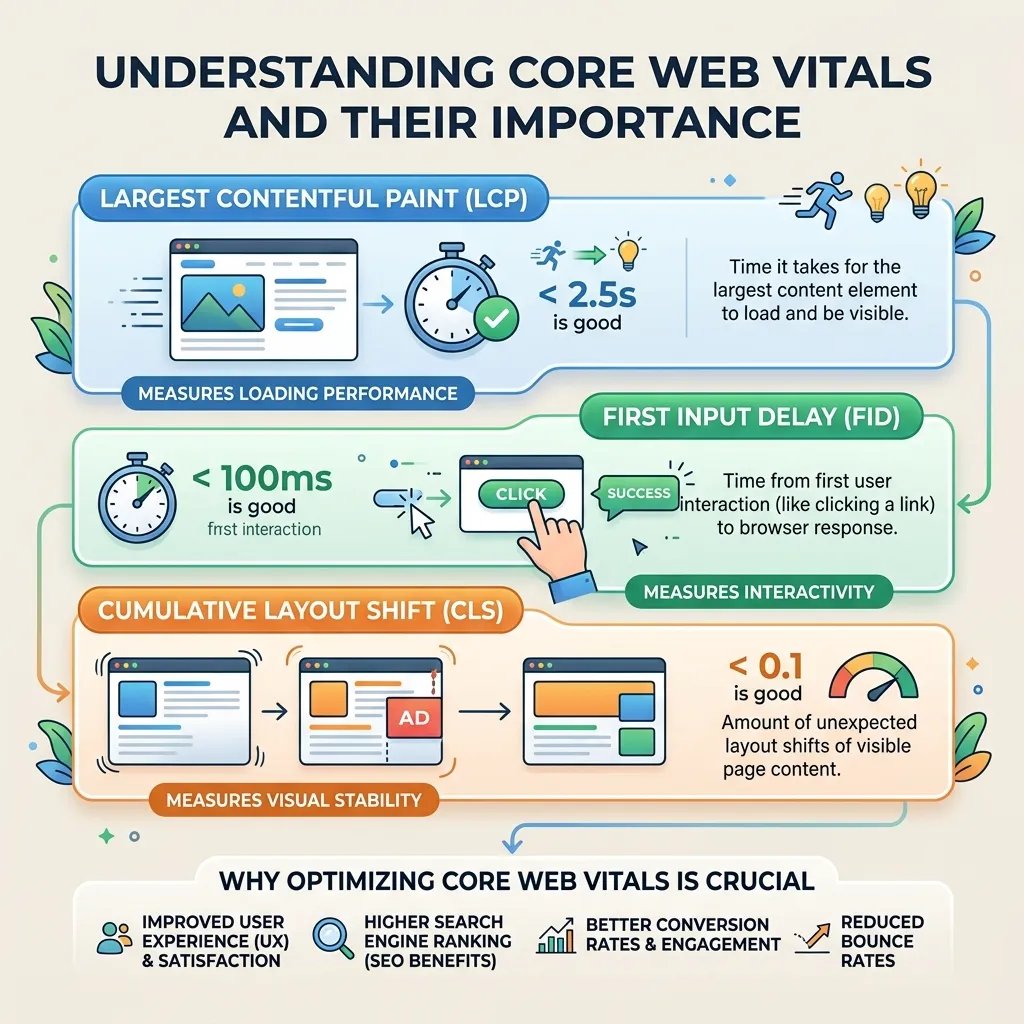
Core Web Vitals are a set of three metrics Google uses to measure real-world user experience. They form part of Google’s Page Experience signals, which influence how pages rank in search results. Understanding these metrics is an important part of web development essentials from design to code.
The three metrics are:
- Largest Contentful Paint (LCP): Measures loading performance. It marks the time it takes for the largest visible element (usually an image or headline) to render. A good LCP is 2.5 seconds or faster.
- Interaction to Next Paint (INP): Measures responsiveness. It tracks how quickly your page reacts to user interactions like clicks and taps. A good INP is 200 milliseconds or less. INP replaced First Input Delay (FID) as a Core Web Vital in March 2024.
- Cumulative Layout Shift (CLS): Measures visual stability. It quantifies how much page elements move around unexpectedly during loading. A good CLS score is below 0.1.
Google evaluates these metrics based on field data from real users, collected through the Chrome User Experience Report (CrUX). To pass, at least 75% of your page visits must meet the “good” threshold for each metric.
Why does this matter beyond rankings? Page experience directly affects business outcomes. Faster, more stable pages keep users engaged, reduce bounce rates, and lift conversion rates. Optimizing Core Web Vitals improves both your SEO and your bottom line.
How do you measure your Core Web Vitals?

Before you fix anything, you need to know where you stand. Several free tools can measure your Core Web Vitals:
- Google PageSpeed Insights: Enter any URL to see both lab data and real-user field data, plus specific recommendations.
- Google Search Console: The Core Web Vitals report shows which pages pass or fail across your entire site, grouped by issue.
- Chrome DevTools (Lighthouse): Run audits directly in your browser to test individual pages during development.
- Web Vitals Chrome Extension: See live metrics as you browse your own site.
Start with field data when possible. Lab data is useful for debugging, but field data reflects what your actual visitors experience across different devices and network conditions.
How to optimize Largest Contentful Paint (LCP)
A slow LCP usually means your most important content takes too long to appear. Here’s how to fix it.
Optimize and compress images
Images are the most common LCP element—and the most common cause of slow loading. To speed them up:
- Serve images in modern formats like WebP or AVIF, which are smaller than JPEG or PNG.
- Compress images before uploading using tools like TinyPNG or Squoosh.
- Use responsive images with the
srcsetattribute so mobile users download appropriately sized files. - Add
fetchpriority="high"to your largest above-the-fold image to tell browsers to load it first.
Improve server response time
If your server is slow to respond, everything else gets delayed. To improve it:
- Use a content delivery network (CDN) to serve content from locations closer to your users.
- Enable caching so repeat visitors don’t reload everything from scratch.
- Upgrade your hosting if you’re on a budget shared plan with limited resources.
Aim for a Time to First Byte (TTFB) under 800 milliseconds.
Eliminate render-blocking resources
CSS and JavaScript files can block your page from rendering. To reduce their impact:
- Minify CSS and JavaScript to shrink file sizes.
- Defer non-critical JavaScript so it loads after the main content.
- Inline critical CSS needed for above-the-fold content.
Preload key resources
Use <link rel="preload"> for important assets like your hero image, key fonts, or critical stylesheets. This tells the browser to fetch them early, which improves loading speed.
How to reduce Cumulative Layout Shift (CLS)
Layout shifts happen when content moves unexpectedly. Few things frustrate users more than tapping a button that suddenly jumps somewhere else. Here’s how to keep your layout stable.
Many CLS issues can be prevented by following responsive design principles covered in what is web design and why it matters.
Set dimensions for images and videos
Always include width and height attributes on images and video elements. This reserves the correct space before the media loads, so surrounding content doesn’t jump. For responsive designs, use CSS aspect-ratio to maintain proportions.
Reserve space for ads and embeds
Ad slots, iframes, and embedded widgets often load late and push content down. Reserve a fixed space for them with a defined container size. If an ad slot might be empty, style it so the space stays consistent.
Avoid inserting content above existing content
Banners, notifications, and cookie notices that appear at the top of the page shove everything down. If you must add dynamic content, reserve space for it in advance or overlay it instead of pushing existing elements.
Use font display strategies
Fonts can cause layout shifts when a fallback font swaps for the web font (known as FOUT). To minimize this:
- Preload your web fonts.
- Use
font-display: optionalorswapthoughtfully. - Match fallback font metrics to your web font using the
size-adjustproperty.
How to improve Interaction to Next Paint (INP)
INP measures how responsive your page feels when users interact with it. Slow responses usually trace back to heavy JavaScript. Here’s how to make interactions snappier.
Break up long JavaScript tasks
Long tasks block the main thread, which delays your page’s response to clicks and taps. To fix this:
- Split large functions into smaller chunks.
- Use
setTimeoutorrequestIdleCallbackto yield to the main thread. - Defer work that isn’t needed immediately.
Reduce JavaScript execution time
The less JavaScript your browser has to process, the faster it responds. To lighten the load:
- Remove unused code and dependencies.
- Use code splitting to load only what each page needs.
- Audit third-party scripts—analytics, chat widgets, and trackers all add overhead.
Optimize event handlers
Keep event handlers lightweight. Avoid running expensive calculations directly inside click or input handlers. Where possible, debounce or throttle frequent events like scrolling and typing.
Use a web worker for heavy computation
If your site performs heavy calculations, move that work to a web worker. This keeps the main thread free to respond to user input, which improves INP.
How to improve mobile page speed
Most websites get more than half their traffic from mobile devices, and Google uses mobile-first indexing. Mobile users also tend to have slower connections and less powerful hardware, so mobile performance often lags behind desktop.
To improve mobile page speed:
- Prioritize mobile testing. Always check your Core Web Vitals on mobile, not just desktop. Scores often differ significantly.
- Reduce payload size. Mobile networks are slower, so smaller files matter more. Compress aggressively.
- Limit third-party scripts. Each extra script hits mobile harder than desktop.
- Use lazy loading. Defer offscreen images and videos with
loading="lazy"so they load only when needed. - Simplify your design. Heavy animations and complex layouts strain mobile processors.
A practical action plan to fix Core Web Vitals issues
Improving Core Web Vitals can feel overwhelming, so tackle it step by step:
- Measure first. Run PageSpeed Insights and check Search Console to find your weakest metrics and worst-performing pages.
- Fix the biggest issues first. Focus on the metric that fails most often, and start with high-traffic pages.
- Optimize images. This single step often improves both LCP and overall loading speed dramatically.
- Stabilize your layout. Add size attributes and reserve space for dynamic content to fix CLS.
- Trim JavaScript. Remove unused code and defer non-critical scripts to improve INP.
- Test on mobile. Verify your changes work on real mobile devices and slower connections.
- Monitor over time. Core Web Vitals use a rolling 28-day window, so improvements take time to appear in field data. Keep measuring.
Turn page speed into a competitive advantage
Improving Core Web Vitals isn’t a one-time project—it’s an ongoing commitment to website performance optimization. Businesses that align technical performance with marketing goals often see stronger SEO, engagement, and conversions, which is why web development enhances marketing performance and supports long-term growth.
Start with a single audit today. Pick your highest-traffic page, run it through PageSpeed Insights, and fix the most obvious issue. Small, consistent improvements compound into faster pages, better rankings, and happier users.
The payoff goes beyond search rankings. Every second you shave off your load time, every layout shift you eliminate, and every interaction you speed up makes your site more enjoyable to use—and more likely to convert.
Frequently asked questions
What is a good Core Web Vitals score?
A good Core Web Vitals score means passing all three metrics: LCP at 2.5 seconds or faster, INP at 200 milliseconds or less, and CLS below 0.1. At least 75% of your real-user page visits must meet these thresholds to pass.
How long does it take to improve Core Web Vitals?
Technical fixes can be implemented in hours or days, but Core Web Vitals field data uses a rolling 28-day window. This means it typically takes about four weeks after deploying changes to see updated scores reflected in tools like Google Search Console.
Do Core Web Vitals affect SEO rankings?
Yes. Core Web Vitals are part of Google’s Page Experience signals and influence search rankings. While content relevance remains the strongest ranking factor, Core Web Vitals can act as a tiebreaker between pages with similar quality content.
What replaced First Input Delay (FID)?
Interaction to Next Paint (INP) replaced First Input Delay (FID) as a Core Web Vital in March 2024. INP measures the responsiveness of all interactions throughout a page visit, making it a more comprehensive metric than FID, which only measured the first interaction.
Can I improve Core Web Vitals without a developer?
You can make several improvements without coding expertise—compressing images, enabling caching plugins, removing unused apps or scripts, and using a CDN. However, fixing render-blocking resources and optimizing JavaScript usually requires developer support or a performance-focused plugin.
How to improve Core Web Vitals on a WordPress website?
To improve Core Web Vitals on a WordPress site, optimize images, enable caching, use a CDN, minimize JavaScript, and choose a lightweight theme. Performance plugins can also help improve loading speed and user experience.
How to improve Core Web Vitals for mobile users?
To improve Core Web Vitals for mobile, reduce page size, compress images, limit third-party scripts, use lazy loading, and prioritize responsive design. Mobile optimization is essential because Google uses mobile-first indexing.
How to improve Core Web Vitals Largest Contentful Paint (LCP)?
To improve Core Web Vitals LCP scores, optimize large images, preload important assets, reduce server response times, and eliminate render-blocking CSS and JavaScript resources.
How to improve Core Web Vitals Cumulative Layout Shift (CLS)?
You can improve Core Web Vitals CLS by adding width and height attributes to images, reserving space for ads and embeds, and preventing unexpected content shifts during page loading.
How to improve Core Web Vitals Interaction to Next Paint (INP)?
To improve Core Web Vitals INP, reduce JavaScript execution time, break up long tasks, optimize event handlers, and remove unnecessary third-party scripts that slow page responsiveness.
Why is it important to learn how to improve Core Web Vitals?
Learning how to improve Core Web Vitals helps boost user experience, reduce bounce rates, increase conversions, and improve your chances of ranking higher in Google search results.
What tools can help measure and improve Core Web Vitals?
Tools such as Google PageSpeed Insights, Google Search Console, Lighthouse, and the Web Vitals Chrome Extension can help identify issues and provide recommendations on how to improve Core Web Vitals.
How long does it take to improve Core Web Vitals scores?
Technical fixes can be implemented quickly, but Google typically updates Core Web Vitals field data over a 28-day period, so measurable improvements may take several weeks to appear.
Can image optimization help improve Core Web Vitals?
Yes, image optimization is one of the most effective ways to improve Core Web Vitals. Compressing images, using WebP or AVIF formats, and serving responsive image sizes can significantly improve page performance.
Can you improve Core Web Vitals without coding skills?
Yes, you can improve Core Web Vitals without advanced coding by using caching plugins, image optimization tools, a CDN, and website performance plugins. More advanced JavaScript optimizations may require developer assistance.







[…] businesses focused on website performance, the guide on Core Web Vitals optimization can provide additional […]
[…] For a deeper optimization process, see the existing How to Improve Core Web Vitals: A Complete Guide. […]