
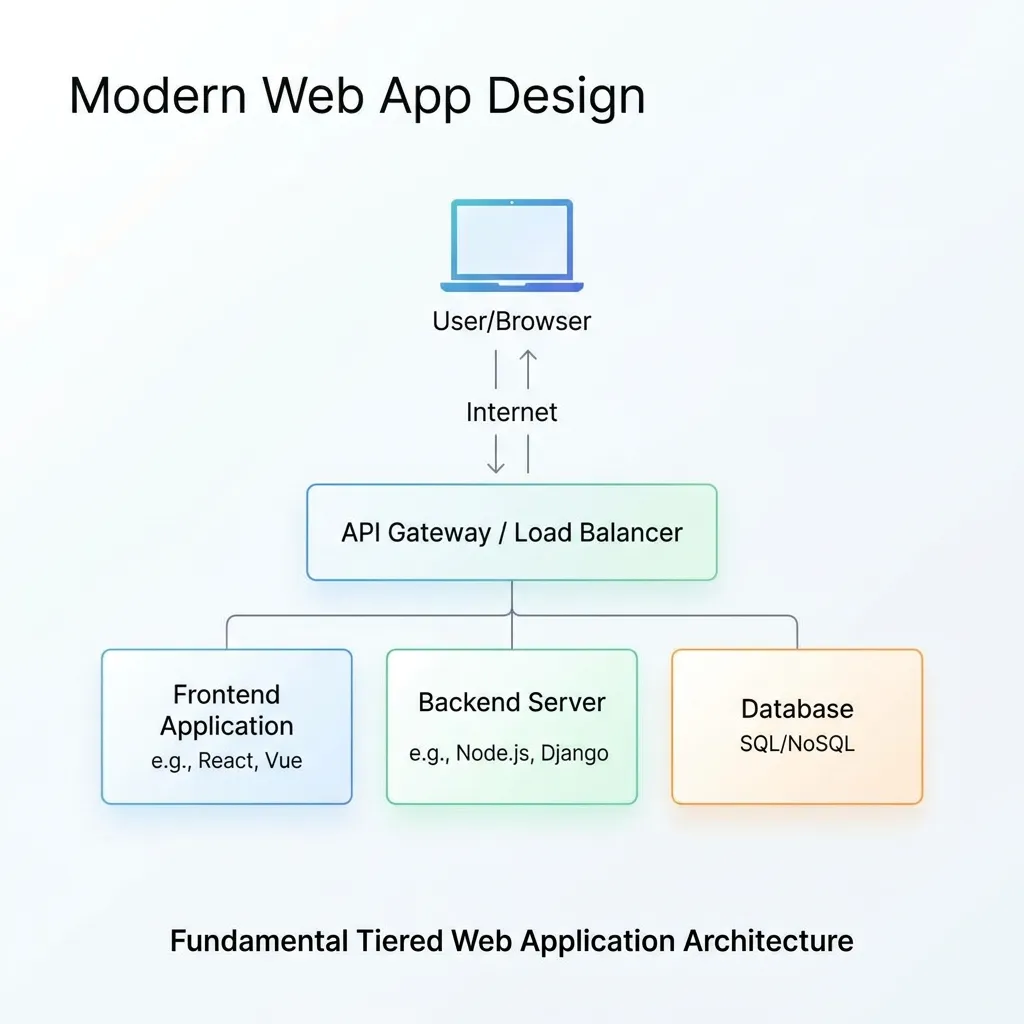
Web application architecture defines how the frontend, backend, database, APIs, servers, and other components of a web application communicate and work together. A well-designed architecture improves scalability, security, performance, maintainability, and reliability. From simple client-server systems to layered, microservices, serverless, and cloud-based architectures, the right approach depends on the application’s requirements, expected traffic, data needs, development resources, and long-term goals. This guide explains the main components, types, benefits, design principles, security considerations, and best practices for building modern web applications.
What Is Web Application Architecture?
Web application architecture is the structural blueprint that defines how different parts of a web application interact with each other.
A typical web application can contain several components, including:
- User interface
- Frontend application
- Backend application
- Web server
- Application server
- APIs
- Database
- Authentication system
- Caching layer
- External services
- Cloud infrastructure
These components work together to process user requests, execute business logic, retrieve or modify data, and return results to the user.
For example, when someone logs into a web application, the browser sends a request to the server. The backend processes the authentication request, communicates with the database, verifies the user’s credentials, creates or validates a session, and returns an appropriate response.
The architecture determines how these responsibilities are divided and how information moves between the different components.
For businesses planning a web application, understanding the web application development process can provide useful context before making architectural decisions.
Why Is Web Application Architecture Important?
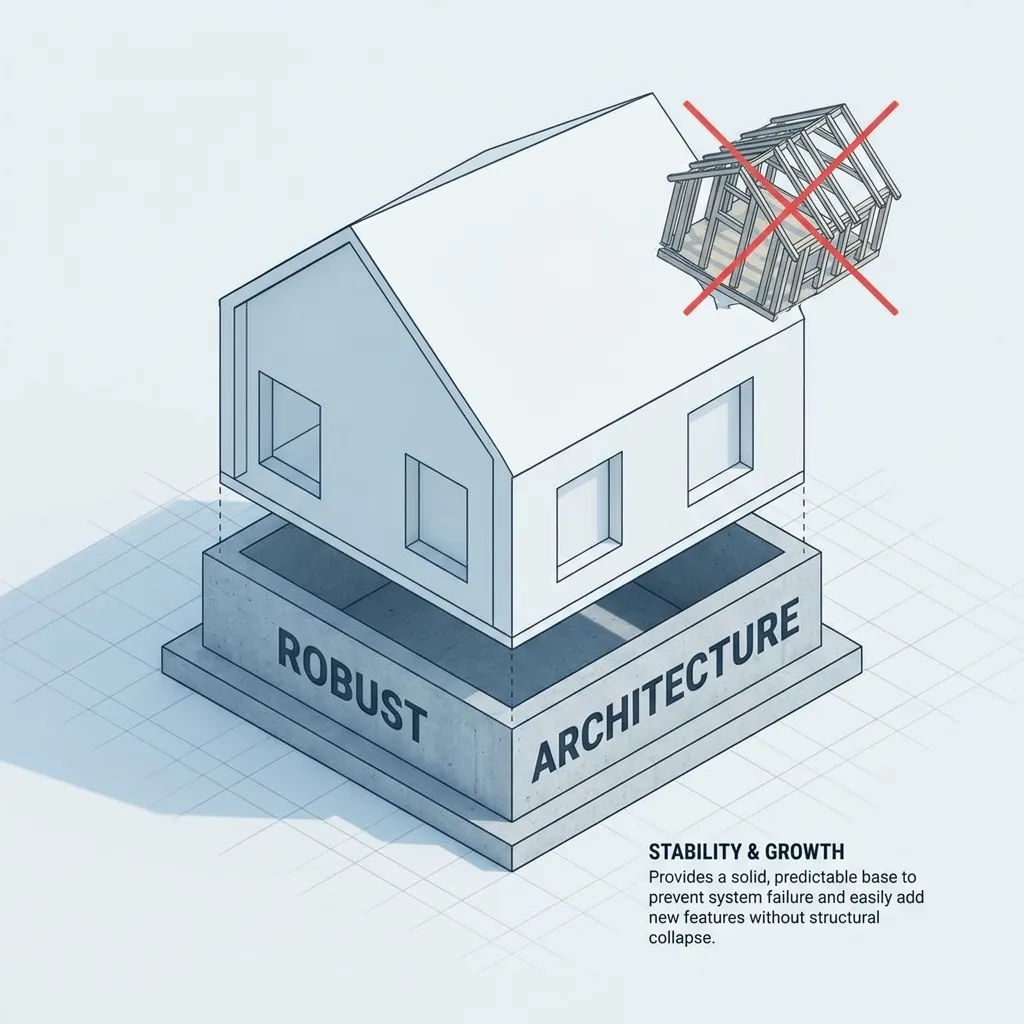
Architecture influences almost every aspect of a web application.
A well-designed architecture can help organizations build applications that are:
- Scalable
- Secure
- Fast
- Reliable
- Maintainable
- Flexible
- Easier to test
- Easier to deploy
- Easier to monitor
Poor architecture can create problems as an application grows. A system that works for a few hundred users may struggle when traffic increases significantly if its components were not designed to scale.
Architecture also affects development efficiency. When responsibilities are clearly separated, developers can modify one part of the application without unnecessarily affecting other components.
Security is another major consideration. OWASP recommends addressing security during architecture and design rather than treating it only as a later coding or testing concern.
How Does Web Application Architecture Work?
At a basic level, web applications use a client-server communication model.
A user’s browser acts as the client, while servers process requests and provide responses. HTTP is the primary protocol used for communication between clients and web servers.
A simplified request flow looks like this:
User → Browser → Web Server → Application → Database → Application → Web Server → Browser
For example:
- A user enters a URL or interacts with the application.
- The browser creates an HTTP request.
- The request reaches the web server.
- The web server routes the request to the appropriate application component.
- The backend processes the request.
- The application communicates with a database or external service if necessary.
- The server generates a response.
- The browser receives and displays the result.
The exact architecture can become much more complex depending on the application’s requirements.
Key Components of Web Application Architecture
Understanding the major components makes it easier to understand how different architectural patterns work.
1. Client-Side Layer
The client-side layer is what users interact with directly.
It typically includes:
- HTML
- CSS
- JavaScript
- Frontend frameworks
- Images
- Forms
- Navigation
- Interactive components
Modern applications may use frameworks such as React, Vue, or Angular to create sophisticated interfaces.
The client communicates with backend services through HTTP requests and APIs.
2. Web Server
The web server receives incoming HTTP requests and delivers web resources or forwards requests to application services.
It may handle:
- Static files
- HTTP requests
- SSL/TLS termination
- Routing
- Compression
- Caching
- Reverse proxy functionality
In larger systems, multiple web servers may be placed behind a load balancer.
3. Application Layer
The application layer contains the business logic that makes the application work.
It can handle:
- User authentication
- Authorization
- Data validation
- Business rules
- Calculations
- API requests
- Workflow processing
- Database interactions
For example, in an e-commerce application, the application layer may calculate product prices, validate inventory, process orders, and communicate with payment services.
4. Database Layer
The database stores application data.
Depending on the project, developers may use:
- Relational databases
- Document databases
- Key-value databases
- Graph databases
- Cloud databases
A relational database might store customers, products, orders, and transactions in structured tables.
Database design is particularly important because inefficient queries or poor data structures can become major performance bottlenecks.
5. API Layer
APIs allow different software components to communicate.
A web application may expose APIs for:
- User authentication
- Product information
- Payments
- Orders
- Customer profiles
- Notifications
- Third-party integrations
REST and GraphQL are common API approaches, while some systems also use asynchronous messaging for communication between services.
6. Authentication and Authorization
Authentication determines who the user is, while authorization determines what that user is allowed to do.
For example:
- A visitor may view public content.
- A registered customer may manage their account.
- An administrator may manage users and application settings.
These controls should be integrated into the architecture rather than added as an afterthought.
7. External Services
Modern web applications often rely on third-party services.
Examples include:
- Payment gateways
- Email providers
- Analytics platforms
- Cloud storage
- Authentication providers
- Maps
- Search services
- Notification systems
The architecture should account for these dependencies and define how the application handles service failures.
Common Types of Web Application Architecture
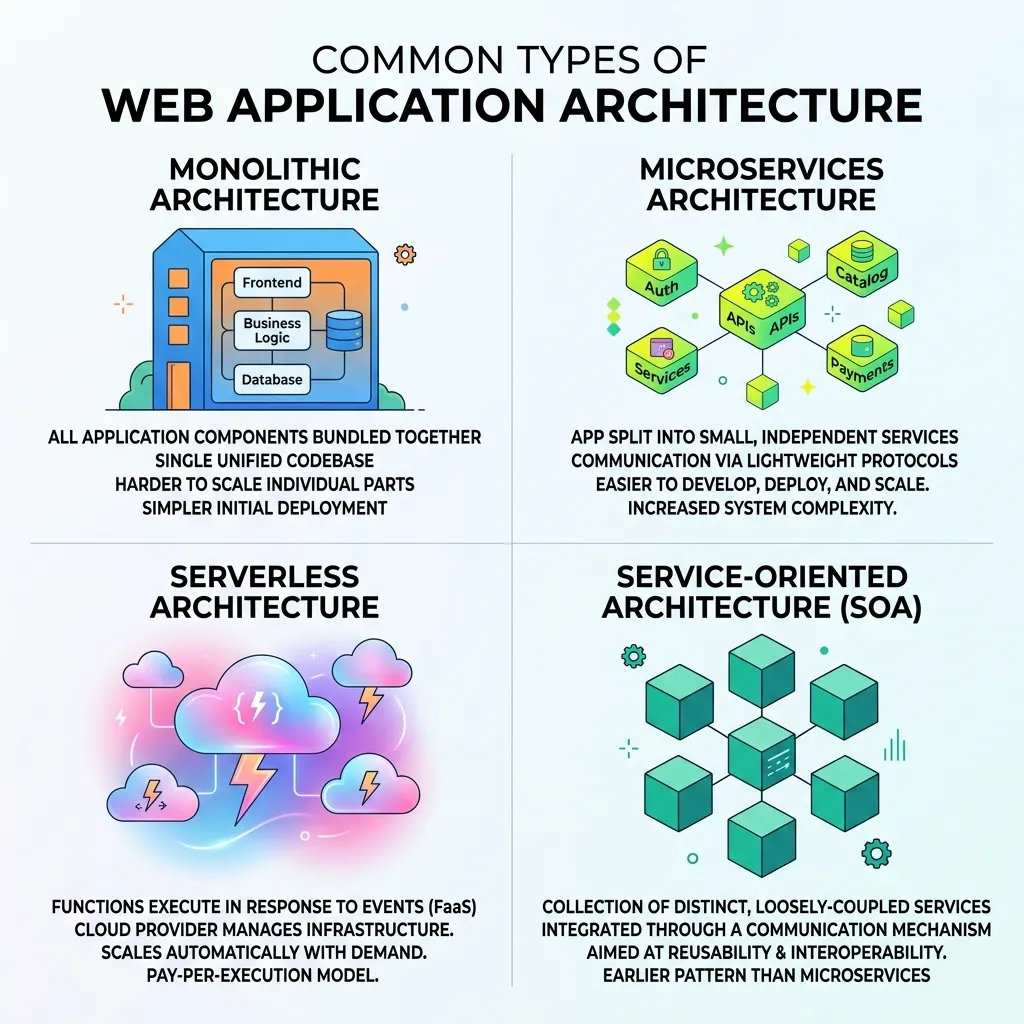
Different applications require different architectural patterns.
1. Monolithic Architecture
In a monolithic architecture, the major application components are combined into one deployable application.
Frontend logic, backend functionality, and business logic may be closely connected within the same application.
Advantages
- Simple to develop initially
- Easier deployment
- Straightforward testing
- Lower infrastructure complexity
- Suitable for smaller applications
Disadvantages
- Can become difficult to maintain as the application grows
- Scaling individual components can be difficult
- A change in one area may affect other areas
- Large deployments can become slower
A monolithic architecture can still be an excellent choice for smaller projects when simplicity is more important than highly distributed infrastructure.
2. Layered Architecture
Layered architecture separates an application into logical layers.
A common structure is:
Presentation Layer → Business Layer → Data Access Layer → Database
The presentation layer handles user interaction.
The business layer contains application rules.
The data access layer communicates with the database.
This separation makes responsibilities easier to understand and maintain.
3. Three-Tier Architecture
Three-tier architecture commonly divides an application into:
- Presentation tier
- Application tier
- Data tier
The presentation tier handles the user interface.
The application tier processes business logic.
The data tier manages stored information.
This approach provides clear separation between major responsibilities.
4. Microservices Architecture
Microservices architecture divides an application into smaller, independently deployable services.
For example, an e-commerce platform might separate:
- User service
- Product service
- Order service
- Payment service
- Notification service
Each service can be developed and scaled independently.
Advantages
- Independent deployment
- Independent scaling
- Team autonomy
- Better separation of responsibilities
- Flexibility in technology choices
Challenges
- Greater infrastructure complexity
- Distributed system failures
- More difficult monitoring
- Network communication overhead
- More complicated deployment
Microservices are powerful, but they are not automatically better than monolithic architecture. They should be used when the project’s complexity and organizational requirements justify them.
5. Serverless Architecture
Serverless architecture allows developers to run application functions without managing traditional application servers directly.
Cloud providers handle much of the underlying infrastructure.
Serverless applications can be useful for:
- Event-driven applications
- APIs
- Background jobs
- File processing
- Automated workflows
However, factors such as execution limits, vendor dependency, cold starts, and cost patterns should be considered before choosing this model.
6. Headless Architecture
A headless architecture separates the frontend presentation layer from backend content or services.
The backend provides data through APIs, while different frontend applications consume that data.
For example, one backend could provide content to:
- Website
- Mobile application
- Smart device
- Digital kiosk
This approach provides flexibility when organizations need to deliver the same data across multiple channels.
Web Application Architecture Patterns
Architecture types and architectural patterns are closely related but should not be treated as exactly the same thing.
Common patterns include:
Model-View-Controller
MVC separates an application into:
- Model
- View
- Controller
The model manages data and business-related information.
The view handles presentation.
The controller manages requests and coordinates interactions between the model and view.
Client-Server Pattern
The client requests resources or services, while the server processes requests and returns responses.
This is one of the fundamental models behind web applications. MDN describes HTTP itself as a client-server protocol in which clients send requests and servers provide responses.
Service-Oriented Architecture
Applications are divided into services that communicate over defined interfaces.
This can support modularity and integration across larger systems.
Event-Driven Architecture
Components communicate through events.
For example:
Order Created → Payment Processing → Inventory Update → Email Notification
The services can react to events rather than requiring every action to happen synchronously.
Web Application Architecture Diagram
A simplified modern architecture may look like this:
User
↓
Browser / Mobile Client
↓
CDN / Load Balancer
↓
Web Server
↓
Application / API Layer
↓
Business Logic
↓
Database / Cache / External Services
This structure can be expanded depending on application requirements.
For larger applications, additional components may include:
- API gateways
- Message queues
- Search engines
- Distributed caches
- Object storage
- Monitoring services
- Authentication providers
- Container orchestration
OWASP’s guidance on mapping application architecture emphasizes understanding the components and their relationships because modern applications can range from a single server to systems distributed across many services.
How to Choose the Right Web Application Architecture

There is no universal architecture that works for every application.
Consider the following factors.
Application Size
A small internal application may not need microservices or complex distributed infrastructure.
Expected Traffic
Applications expecting significant traffic may need load balancing, caching, horizontal scaling, and other performance mechanisms.
Development Team
A small team may benefit from an architecture that is easier to operate.
A large engineering organization may have the resources to manage distributed systems.
Budget
More complex architecture usually requires more infrastructure, monitoring, deployment, and maintenance resources.
Security Requirements
Applications handling sensitive information may require stronger isolation, access controls, encryption, logging, and security monitoring.
Performance Requirements
Real-time applications may require different architectural decisions from content-focused websites.
Future Growth
Consider how the application may evolve over the next several years.
The goal should be to choose an architecture that supports expected growth without introducing unnecessary complexity.
Web Application Architecture and Scalability
Scalability describes an application’s ability to handle increasing workloads.
There are two common approaches.
Vertical Scaling
Vertical scaling increases the resources of an existing server.
For example:
- More CPU
- More RAM
- Faster storage
It is relatively simple but has physical and infrastructure limits.
Horizontal Scaling
Horizontal scaling adds more servers or application instances.
A load balancer can distribute incoming requests across multiple instances.
Horizontal scaling can provide greater flexibility for growing applications, although it introduces additional infrastructure and coordination requirements.
Caching can also improve scalability by reducing repeated database or application work.
Web Application Architecture and Security
Security should be considered during architecture design.
A secure architecture should address:
- Authentication
- Authorization
- Encryption
- Secure API design
- Input validation
- Session management
- Secrets management
- Logging
- Monitoring
- Network segmentation
- Least privilege
- Dependency security
OWASP’s secure architecture guidance emphasizes principles such as least privilege, defense in depth, secure defaults, and reducing attack surface.
For developers working on security-sensitive applications, this guide to securing web applications can provide additional context.
Security architecture should also account for failure scenarios. If one service becomes compromised, the architecture should reduce the possibility of unrestricted access to other components.
Web Application Architecture and Performance
Architecture has a direct impact on application performance.
Important considerations include:
Caching
Caching can reduce repeated database queries and improve response times.
Content Delivery Networks
A CDN can distribute static resources closer to users.
Database Optimization
Efficient queries, indexing, connection management, and appropriate database design can improve performance.
Load Balancing
Load balancers distribute traffic across multiple servers or application instances.
Asynchronous Processing
Background jobs can move time-consuming operations away from the main request-response cycle.
Efficient APIs
APIs should return the data necessary for the requested operation without creating unnecessary processing or network overhead.
For broader performance considerations, see this website performance optimization guide.
Best Practices for Web Application Architecture
Follow these principles when designing a web application.
Keep the Architecture as Simple as Practical
Do not introduce complex infrastructure unless the application’s requirements justify it.
Separate Responsibilities
Each component should have a clear responsibility.
Design for Security
Consider security requirements from the beginning rather than after development.
Plan for Failure
External services, servers, databases, and networks can fail. Design appropriate recovery and fallback mechanisms.
Make Components Observable
Use logging, metrics, monitoring, and tracing to understand system behavior.
Document the Architecture
Architecture documentation helps developers, testers, security teams, and operations teams understand how the system works.
Design for Maintainability
A technically impressive architecture is not useful if developers cannot understand or maintain it.
Review Architecture as the Application Evolves
An architecture that works well at launch may need to change as the application grows.
Common Web Application Architecture Mistakes
Choosing Microservices Too Early
Microservices can add unnecessary complexity to small applications.
Ignoring Security During Design
Adding security controls only after development can lead to expensive architectural changes.
Creating a Single Point of Failure
If one component can bring down the entire application, consider redundancy and failure handling.
Poor Database Design
A weak database structure can create performance and reliability problems.
Ignoring Monitoring
Without monitoring, diagnosing production problems becomes much harder.
Overengineering
Adding unnecessary technologies can increase costs and maintenance requirements without providing meaningful benefits.
Failing to Document the System
Poor documentation makes onboarding, troubleshooting, and future development more difficult.
Web Application Architecture vs. Web Development
Web development is the broader process of designing, building, testing, deploying, and maintaining websites and web applications.
Architecture is one part of that process.
It focuses specifically on the structure and relationships between application components.
For a broader understanding, explore this complete guide to web application development.
Architecture decisions can influence:
- Technology selection
- Database design
- API development
- Security
- Deployment
- Testing
- Performance
- Scalability
- Maintenance
Therefore, architecture should be considered early in the development lifecycle.
When Should You Design Web Application Architecture?

Architecture should be considered before significant implementation begins.
A practical process is:
- Understand business requirements.
- Identify users and use cases.
- Define functional requirements.
- Define performance and security requirements.
- Estimate traffic and data requirements.
- Select an appropriate architecture pattern.
- Identify major components.
- Define data flows.
- Identify external dependencies.
- Review scalability and failure scenarios.
- Document the architecture.
- Begin implementation and continuously validate the design.
Architecture is not necessarily a one-time decision. As requirements change, the architecture may need to evolve.
Conclusion
Web application architecture provides the foundation for how a web application operates, communicates, scales, and remains secure. It defines the relationships between the frontend, backend, databases, APIs, servers, authentication systems, external services, and infrastructure.
Simple applications may benefit from monolithic or layered architecture, while larger systems may require microservices, event-driven components, serverless services, or other distributed approaches. The right choice depends on the application’s requirements rather than the popularity of a particular technology.
When designing an architecture, prioritize simplicity, clear separation of responsibilities, security, scalability, performance, observability, and maintainability. Most importantly, avoid adding complexity without a clear business or technical reason.
A strong architecture gives development teams a reliable foundation for building applications that can evolve as users, traffic, data, and business requirements grow.
Frequently Asked Questions
1. What is web application architecture?
Web application architecture is the structural design that defines how the frontend, backend, database, APIs, servers, and other components of a web application communicate and work together.
2. What are the main components of web application architecture?
Common components include the client or frontend, web server, application layer, APIs, database, authentication system, caching layer, and external services.
3. What is the most common web application architecture?
Client-server architecture is a fundamental model used across the web. Many modern applications build on this model using layered, monolithic, microservices, serverless, or other architectural approaches.
4. What is a three-tier architecture?
Three-tier architecture separates an application into presentation, application, and data tiers. This creates clear separation between the user interface, business logic, and data management.
5. What is the difference between monolithic and microservices architecture?
A monolithic application generally operates as a single deployable unit, while microservices divide functionality into smaller independently deployable services.
6. Is microservices architecture better than monolithic architecture?
Not always. Microservices can provide independent scaling and deployment, but they also introduce additional operational and development complexity. The best choice depends on project requirements.
7. Why is security important in web application architecture?
Architecture determines how components communicate, where sensitive data is stored, how access is controlled, and how systems are isolated. Security decisions made at the architecture stage can prevent vulnerabilities and reduce costly changes later.
8. How does architecture affect web application performance?
Architecture influences caching, database access, server communication, load distribution, API efficiency, and scalability. Good architectural decisions can reduce bottlenecks and improve application responsiveness.
9. What is scalable web application architecture?
A scalable architecture allows an application to handle increasing users, requests, or data without unacceptable performance degradation. It may use techniques such as horizontal scaling, load balancing, caching, and distributed services.
10. What is serverless architecture?
Serverless architecture allows developers to run application functionality without directly managing traditional application servers. Cloud providers manage much of the underlying infrastructure.
11. How do I choose the right web application architecture?
Consider application size, expected traffic, security requirements, budget, development team, performance needs, data requirements, integrations, and future growth before selecting an architecture.
12. Should web application architecture be documented?
Yes. Architecture documentation helps developers and technical teams understand components, data flows, dependencies, security boundaries, and deployment structures. It also makes future maintenance and troubleshooting easier.






[…] For a broader understanding of how applications are structured, see the site’s guide to web application architecture. […]
[…] existing Web Application Architecture: A Complete Guide can provide additional context when evaluating architectural […]
[…] cost more to build than simpler applications with straightforward data needs. Our detailed guide on web application architecture explains how these underlying technical decisions directly affect both initial development time and […]
[…] increasingly popular patterns like micro-frontends for large, multi-team frontend codebases. This complete guide to web application architecture breaks down the tradeoffs between these approaches in detail, while this overview of […]
[…] phase that happens right before launch. This decision should connect directly back to your chosen application architecture, since architectural choices significantly influence which testing approaches are practical and […]
[…] may find REST’s lower operational overhead a better fit for their actual capacity. Our guide to web application architecture covers how API design decisions like this one fit into the broader architectural choices a project […]
[…] architecture connects closely with topics covered in our web application architecture guide, where we discuss how different execution models affect the overall structure of a modern […]