
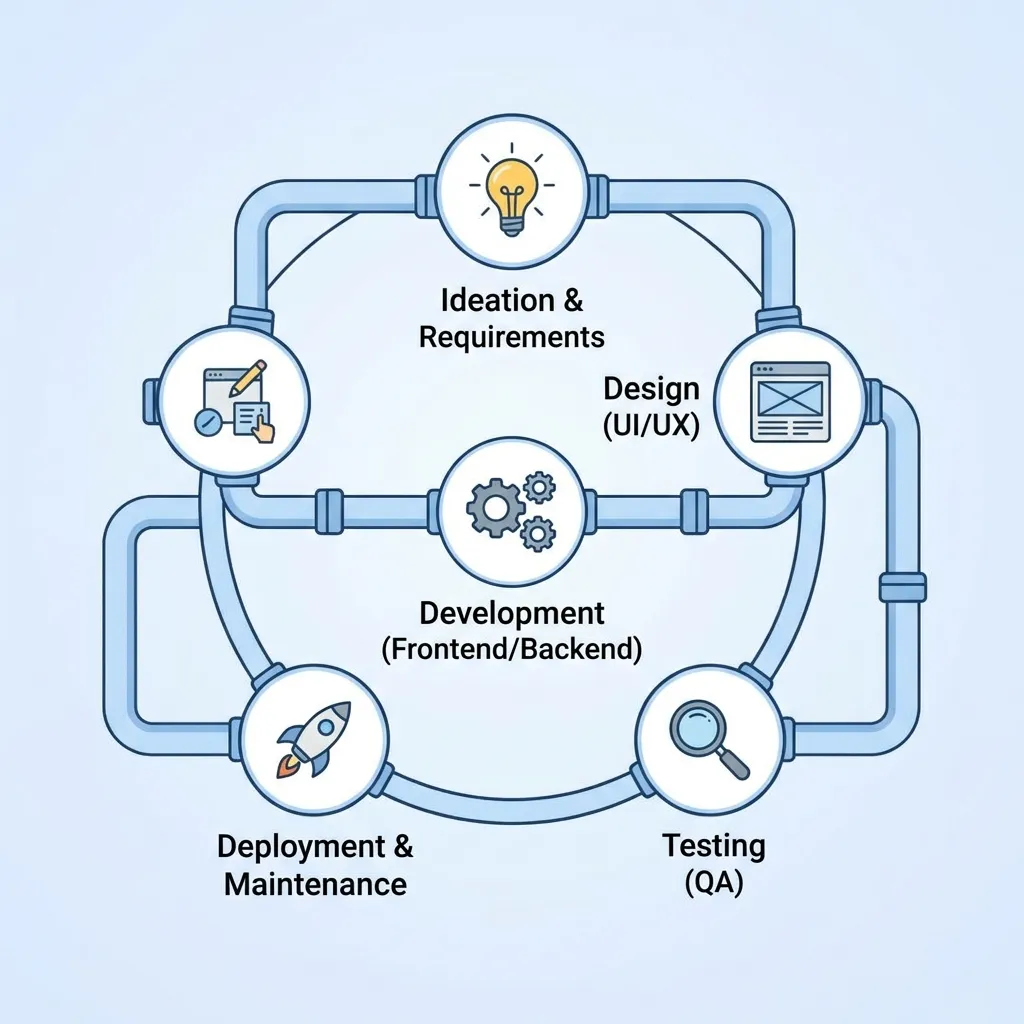
Web Application Development is the process of creating web-based applications that allow users to perform specific tasks through a browser. From business dashboards and eCommerce platforms to customer portals and SaaS products, web applications support a wide range of digital needs. This guide explains the web application development process, architecture, frameworks, security, performance, testing, development costs, and the steps required to build a successful web application.
What Is Web Application Development?
Definition of Web Application Development
Web Application Development is the process of designing, building, testing, deploying, and maintaining applications that run through web browsers.
Unlike a simple static webpage, a web application typically allows users to interact with data, accounts, features, or business functions.
Examples include:
- Online banking platforms
- eCommerce applications
- Project management tools
- Customer portals
- Booking systems
- Learning management systems
- SaaS applications
- Social platforms
- Business dashboards
A web application can be built for internal business operations, public users, customers, employees, or a combination of different audiences.
How Web Applications Work
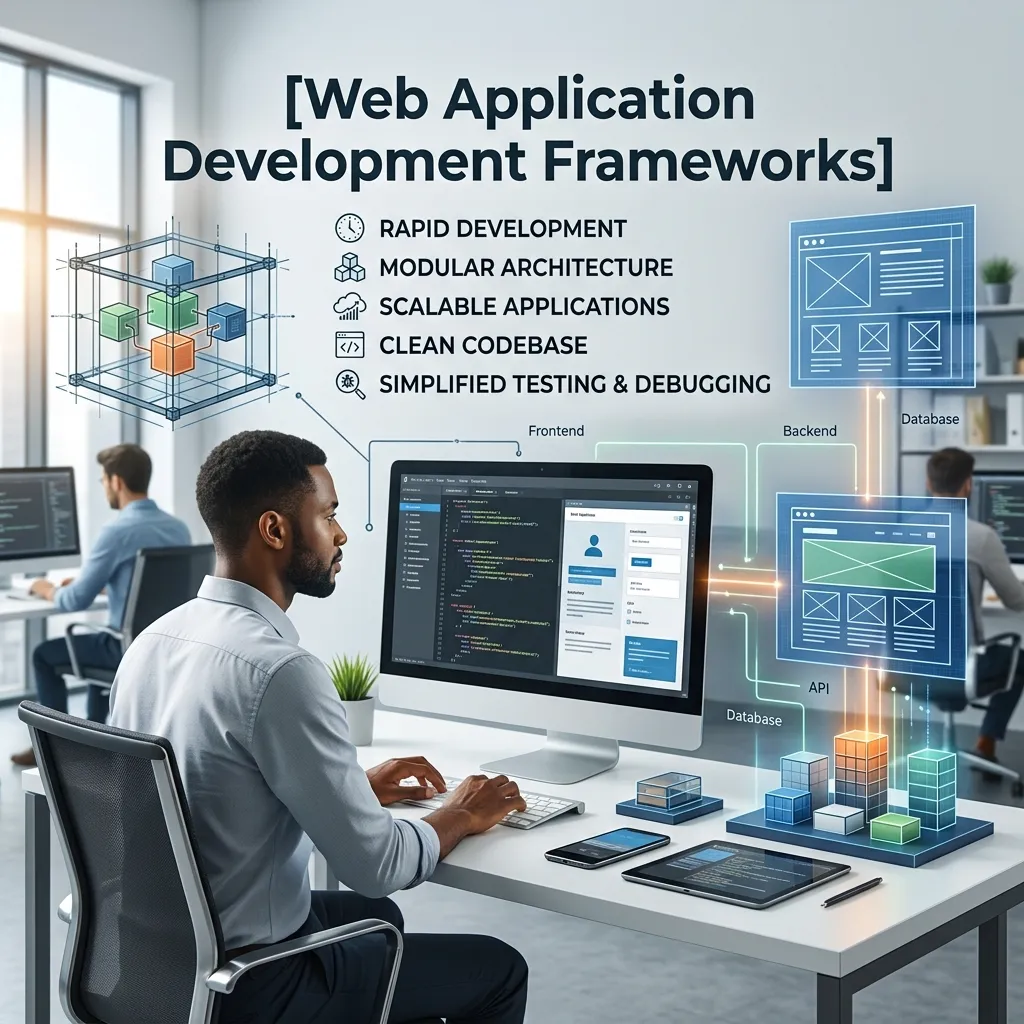
A typical web application involves three major components:
Frontend: The part users interact with through a browser.
Backend: The server-side logic that processes requests and manages application functionality.
Database: The system used to store and retrieve application data.
When a user performs an action, the frontend communicates with the backend. The backend processes the request, interacts with the database when necessary, and returns information to the user interface.
Web Application Development Process

A structured Web Application Development Process helps teams move from an initial idea to a reliable and scalable application.
1. Define Requirements
The first step is understanding what the application needs to accomplish.
Define:
- Target users
- Business objectives
- Core features
- User problems
- Functional requirements
- Technical requirements
- Project scope
Clear requirements reduce unnecessary development work later.
2. Plan the Application
Create a development roadmap covering features, technology, resources, timelines, and priorities.
Teams often separate features into:
- Must-have features
- Important features
- Future features
This helps create a practical Minimum Viable Product (MVP).
3. Design the User Experience
Design wireframes, user flows, interfaces, and prototypes before development begins.
A good design should make important actions easy to discover and use.
4. Choose the Technology Stack
Select frontend technologies, backend technologies, databases, hosting infrastructure, APIs, and other required tools.
Technology choices should match the application’s requirements rather than simply following trends.
5. Develop the Application
Developers build frontend interfaces, backend functionality, databases, APIs, authentication systems, and integrations.
Development can be organized into smaller modules so teams can test and release features progressively.
6. Test the Application
Testing identifies functional, security, usability, compatibility, and performance issues before launch.
7. Deploy the Application
Once the application passes testing, it can be deployed to a production environment.
Deployment includes configuring:
- Hosting
- Domains
- Databases
- SSL/TLS
- Environment variables
- Monitoring
- Backup systems
8. Maintain and Improve
Web application development does not end after launch.
Applications require:
- Security updates
- Bug fixes
- Performance optimization
- Feature improvements
- Monitoring
- Database maintenance
Custom Web Application Development

What Is Custom Web Application Development?
Custom Web Application Development involves creating an application specifically around the requirements of a particular business or user group.
Instead of adapting an existing solution, developers build features and workflows based on specific requirements.
Benefits of Custom Web Applications
Custom applications can provide:
- Greater flexibility
- Specialized workflows
- Better integration
- Scalable architecture
- Customized user experiences
- Greater control over functionality
When Should You Choose Custom Development?
Custom development may make sense when:
- Existing software cannot meet your requirements
- Your business has unique workflows
- You need specialized integrations
- Scalability is important
- You require extensive customization
For simple requirements, however, an existing platform or SaaS solution may be more cost-effective.
Web Application Architecture
What Is Web Application Architecture?
Web Application Architecture describes how different components of a web application communicate and work together.
A common architecture includes:
Client → Web Server → Application Server → Database
More complex systems can include APIs, caching layers, content delivery networks, authentication services, message queues, and cloud infrastructure.
Common Web Application Architecture Types
Monolithic Architecture
Frontend and backend functionality are generally organized as one application.
It can be simpler to develop initially but may become harder to scale and maintain as the application grows.
Microservices Architecture
The application is divided into smaller services that communicate through APIs or other mechanisms.
Microservices can provide scalability and independent deployment but also introduce additional operational complexity.
Serverless Architecture
Some backend functionality runs through managed cloud services without requiring the development team to maintain traditional application servers.
The right architecture depends on application size, team expertise, scalability requirements, budget, and operational needs.
Web Application Development Frameworks
Frontend Frameworks
Frontend development frameworks and libraries help developers create interactive user interfaces.
Popular options include:
- React
- Angular
- Vue
- Svelte
Backend Frameworks
Backend frameworks provide structures for developing server-side applications.
Common choices include:
- Node.js
- Django
- Laravel
- Ruby on Rails
- Spring Boot
- ASP.NET Core
How to Choose a Framework
Consider:
- Project requirements
- Developer expertise
- Performance needs
- Community support
- Security
- Scalability
- Available libraries
- Long-term maintenance
The best Web Application Development Frameworks are not necessarily the newest ones. The right choice is the framework that fits the application’s technical and business requirements.
Web Application Security
Why Web Application Security Matters
Web Application Security protects applications, users, data, and infrastructure from unauthorized access and attacks.
Security should be considered from the beginning rather than added immediately before launch.
Common Web Application Security Risks
Applications may face risks such as:
- Broken access control
- Injection attacks
- Cross-site scripting
- Authentication weaknesses
- Insecure configurations
- Sensitive data exposure
- Vulnerable dependencies
The OWASP Top 10 is a widely used reference for understanding major web application security risks.
Web Application Security Best Practices
Developers should consider:
- Strong authentication
- Proper authorization
- Secure password storage
- Input validation
- Output encoding
- HTTPS
- Secure session management
- Dependency updates
- Security testing
- Access controls
- Logging and monitoring
Security requirements should also be reviewed whenever application functionality changes.
Web Application Performance
Why Web Application Performance Matters
Web Application Performance affects usability, engagement, and the overall user experience.
Slow applications can make important tasks frustrating and may increase abandonment.
Factors That Affect Performance
Performance can be influenced by:
- Large images
- Unoptimized JavaScript
- Slow database queries
- Excessive API requests
- Poor caching
- Server response time
- Third-party scripts
- Inefficient application logic
How to Improve Web Application Performance
Developers can improve performance by:
- Compressing assets
- Optimizing images
- Implementing caching
- Reducing unnecessary requests
- Optimizing database queries
- Using a CDN where appropriate
- Minimizing unnecessary JavaScript
- Monitoring server performance
Performance should be measured continuously instead of relying only on subjective impressions.
Web App vs Website
What Is a Website?
A website primarily provides information to visitors.
Examples include:
- Company websites
- Blogs
- News websites
- Portfolio websites
- Informational websites
What Is a Web App?
A web application provides interactive functionality that allows users to perform tasks.
Examples include:
- Online banking
- Project management
- Booking systems
- Customer dashboards
- Online stores
Web App vs Website Comparison
| Feature | Website | Web Application |
|---|---|---|
| Primary purpose | Information | Interaction and functionality |
| User accounts | Optional | Often important |
| User interaction | Usually limited | Usually extensive |
| Data processing | Limited | Significant |
| Personalization | Limited | Often extensive |
| Complexity | Usually lower | Usually higher |
The distinction is not always absolute because modern websites can include application-like features.
Web Application Development Cost
What Determines Development Cost?
Web Application Development Cost depends on the application’s complexity and requirements.
Important factors include:
- Number of features
- Design requirements
- Technology stack
- Development team
- Integrations
- Security requirements
- Database complexity
- Testing
- Hosting
- Maintenance
- Third-party services
Simple Web Application
A simple application with basic functionality generally requires fewer development resources.
Medium-Complexity Web Application
Applications with authentication, dashboards, APIs, payments, integrations, and advanced workflows require more development and testing.
Complex Web Application
Large applications may require sophisticated architecture, advanced security, cloud infrastructure, extensive testing, and dedicated development and DevOps teams.
Instead of focusing only on the initial development price, businesses should consider the total cost of ownership, including maintenance, hosting, security, support, and future development.
How to Build a Web Application
Step 1: Define the Problem
Start by identifying the user problem the application will solve.
Step 2: Research Users
Understand the target audience, their needs, behaviors, and expectations.
Step 3: Define Core Features
Create a feature list and prioritize the most important functionality.
Step 4: Create Wireframes
Map out the application’s screens and user journeys.
Step 5: Select the Technology Stack
Choose technologies based on requirements, scalability, security, and team expertise.
Step 6: Develop an MVP
Build the smallest useful version of the application that can be tested with real users.
Step 7: Test the Application
Perform functional, security, usability, compatibility, and performance testing.
Step 8: Deploy
Move the application to a production environment and configure monitoring and security.
Step 9: Collect Feedback
Observe how users interact with the application and identify areas for improvement.
Step 10: Continue Development
Release improvements, fix issues, update dependencies, and expand features based on user needs.
Web Application Testing
What Is Web Application Testing?
Web Application Testing is the process of evaluating an application’s functionality, usability, security, compatibility, and performance.
Functional Testing
Functional testing verifies that features work as expected.
Examples include:
- Login
- Registration
- Search
- Checkout
- Forms
- Payments
- Account management
Security Testing
Security testing identifies weaknesses that could expose users, data, or systems.
Performance Testing
Performance testing evaluates how the application behaves under different workloads.
Compatibility Testing
Compatibility testing checks whether the application works properly across different browsers, devices, and operating systems.
Usability Testing
Usability testing examines whether users can understand and complete important tasks efficiently.
Automated Testing
Automated tests can repeatedly check application functionality and help development teams identify regressions during future releases.
Best Practices for Web Application Development
Plan Before Coding
Clear requirements and architecture can reduce development problems.
Prioritize Security
Security should be integrated into the development lifecycle.
Design for Scalability
Consider how the application may grow in users, data, traffic, and functionality.
Optimize Performance
Monitor application performance and address bottlenecks before they become major problems.
Use Version Control
Version control helps development teams track changes and collaborate effectively.
Test Continuously
Testing should occur throughout development instead of only at the end.
Monitor After Launch
Use monitoring and logging to identify errors, performance problems, and unusual activity.
Document Important Systems
Technical documentation helps developers understand architecture, APIs, deployment processes, and application dependencies.
Future Trends in Web Application Development

AI-Powered Web Applications
AI can add features such as recommendations, automation, natural-language interfaces, search, and intelligent customer support.
Progressive Web Applications
Progressive Web Apps can combine web technologies with app-like capabilities depending on browser and platform support.
Cloud-Native Development
Cloud infrastructure can help applications scale and integrate with managed services.
API-First Development
API-first approaches can make it easier to connect web applications with mobile applications, third-party systems, and other services.
Increased Security Focus
As web applications process more sensitive information, security will remain an important development priority.
Conclusion
Web Application Development is a multi-stage process that combines planning, design, programming, architecture, security, testing, deployment, and ongoing maintenance.
A successful web application should solve a real user problem while providing reliable performance, strong security, intuitive usability, and room for future growth.
Whether you are building a simple customer portal or a complex SaaS platform, the development process should begin with clear requirements and a suitable technical architecture. From there, businesses can select appropriate frameworks, develop core features, test thoroughly, launch carefully, and continuously improve the application based on real user feedback.
Frequently Asked Questions About Web Application Development
1. What is Web Application Development?
Web Application Development is the process of designing, developing, testing, deploying, and maintaining applications that run through web browsers.
2. What is the difference between a website and a web application?
A website primarily provides information, while a web application usually provides interactive features that allow users to perform specific tasks.
3. How long does it take to develop a web application?
Development time depends on the application’s complexity, number of features, technology stack, integrations, testing requirements, and development team.
4. How much does Web Application Development cost?
The cost varies significantly depending on features, design, technology, integrations, security, testing, hosting, and maintenance requirements.
5. What technologies are used for web application development?
Common technologies include HTML, CSS, JavaScript, frontend frameworks such as React and Angular, backend technologies such as Node.js and Django, and databases such as PostgreSQL and MySQL.
6. What is custom web application development?
Custom web application development involves creating an application specifically around the requirements, workflows, and goals of a particular business or user group.
7. What is web application architecture?
Web application architecture describes how components such as the frontend, backend, APIs, databases, servers, and external services interact with each other.
8. Which Web Application Development Framework is best?
There is no single best framework. The right framework depends on project requirements, team expertise, scalability, performance, security, and long-term maintenance needs.
9. How can I improve web application security?
Use secure authentication and authorization, HTTPS, input validation, proper access controls, secure session management, dependency updates, monitoring, and regular security testing.
10. Why is web application testing important?
Testing helps identify functional errors, security weaknesses, compatibility problems, usability issues, and performance bottlenecks before and after deployment.
11. How can I improve Web Application Performance?
Optimize images and code, reduce unnecessary requests, improve database queries, use caching where appropriate, optimize server performance, and continuously monitor application behavior.
12. How do I start building a web application?
Start by defining the problem and target users, identifying core features, creating a product plan, designing user flows, selecting the technology stack, developing an MVP, testing it, and deploying it.





[…] businesses planning a web application, understanding the web application development process can provide useful context before making architectural […]
[…] businesses developing custom applications, understanding the web application development process is useful because security should be integrated into every development stage rather than treated as […]
[…] guide on the web application development process walks through how a structured approach to planning and execution naturally supports more […]
[…] a deeper foundation on the development process testing fits into, see our web application development process guide, or explore our complete guide to web application security to strengthen your testing […]